Help
Incident/ Injury Information
Overall description
Purpose: Form is used to enter information regarding the incident or injury
Layout: The page is organized in 8 collapsible sections. See below for specifics if available for each section.
Common Page Functions
Lists and Suggestions: The content of drop down lists, are
managed by the application's administrator.
Any user can suggest a change to the list. (see lists
modification and suggestions)
Section Information
- Location
- Scene Body Information
- Investigating Agency
- Photos/ Video
- Special Circumstances
- Implements
- Mecap Information
- Last Seen Alive
When the check box Same Address as Death Location or Same address as Decedents Residence is checked,
all the other fields in the section became read only and they display the information entered for the appropriate information.
By clicking on the Copy Death Location Address or Copy Decedents Address all the data from the appropriate address
fields are copied into the incident address fields and the field remain available to be edited; this could be used as a
short cut when most, but not all the information is shared between this two location. After the information is copied over, it can be then modified to the correct values.
Select a Place Type†from the drop down list. Depending on the selection made in place type will denote the available data entry for place and address.
Certain selections in place
type will allow the user to pick a corresponding organization from place which will be a drop down. For those locations there is no need to enter the address as it is already
known by the system. For example hospital locations.
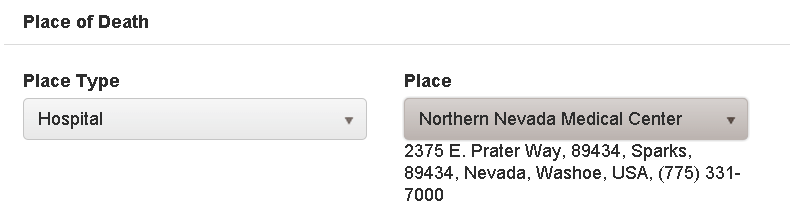
Other selections in place type will denote the user typing in the place and entering the address. These are selections that the system does not know the address for example a residence.
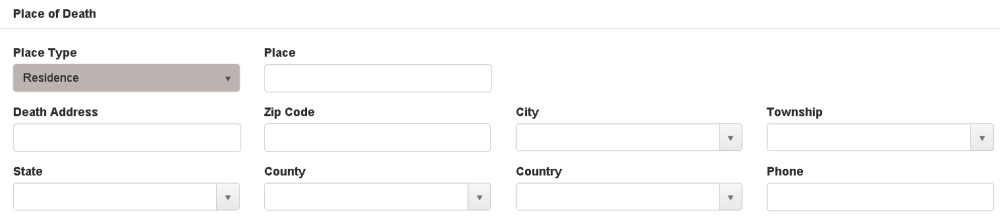
Please note these choices are configured by the system administrator and are configurable.
System will calculate Time between office depart and Arrived scene by user entering into Depart Office Date/ Time and Arrive Scene Date/ Time.
System will calculate Time between Departed Scene and Return to Office by user entering Arrived Scene Date/ Time and Departed Scene Date/ Time
System will calculate Time between Arrived Scene and Arrived Office by user entering Arrived Scene Date/ Time and Arrived Office Date/ Time
Standard data entry
User can enter a new investigating agency by pushing the +new button.  This will bring up a pop up where user can enter agency, officer, badge number. Grid will show a list of all entered investigating agencies.
Standard data entry
Standard data entry
Standard data entry
Standard data entry
Standard data entry