Help

Untitled 3
Tox Request
Purpose:
This is a case related form which is used to enter requested tox submissions. This form allows the user to associate tests and specimens to the individual submission
Navigation Tips:
 : Click to enter a new tox request record,
 - The User will be required to enter a value into fields Laboratory, one or many requested tests, one or many specimens, Requested By and Requested Date before they can save the record.
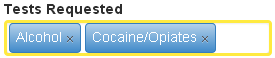
- Many tests can be selected for a single submission. Test Requested is a multiple select drop down, as seen below
- The specimen’s dropdown will contain all possible specimens (specimen’s types).
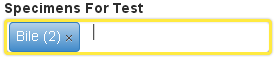
- if there have been specimens that were previously entered for the case (specimens added from Specimen Entry form) the specific specimen in the dropdown will show the number of specimens of this type that exist now in the system. For example if the user has entered 2 specimens on Specimen Entry form of type "Bile", the Specimens multi select drop down should show "Bile (2 samples)"
- Specimen Return Expected A user can check this box if they expect any of the associated samples to be returned after the Lab has finished the test. Once these items have been entered, these items will then display on the “Specimen Transfer†form & also on the Expected Item Return form.